The idea wasn’t unique. We had a house full of Alexa devices and enjoyed being able to quickly ask for lights to be turned on or off, set timers and play music on command. However, in March of 2025 Amazon announced all audio would be sent to their cloud servers for processing. It wasn’t clear how much of our day to day chatter was being recorded and saved into Bezos’ computers, and we became a little uncomfortable having little microphones everywhere recording our every utterance. Why couldn’t we run our own voice assistant on a computer in the house without needing to send anything to the cloud?
I had a very old computer (i5-3570 + 8GB RAM + 1050 Ti GPU) that I thought I could repurpose for a simple private voice assistant. The GPU wouldn’t be able to do much, but I’d already been doing lots of testing of small open-source LLMs and thought there might be some tiny model that could handle the basic tasks we used most frequently.
So the story starts with that idea and that old computer, and a year of mostly going in wrong directions before any of it really worked.
1. The Wyoming Pipeline: Following the Well-Trodden Path#
It started, like most people’s did, by reading the forums and discovering that everyone who’d ditched Alexa was walking the same path. The standard community build was using Wyoming, the Rhasspy team’s simple TCP protocol for stringing voice services into a pipeline, and they’d already built Wyoming-compatible containers for all the popular models. I put together a Docker Compose file and a controller script to tie it together, OpenWakeWord listening, Whisper for speech-to-text, Ollama for the LLM, Piper for the voice. On the surface it looked clean and modular.
flowchart LR
    Mic[(Microphone)] --> Controller[["Controller
(app.py)"]]
    Controller --> Speaker[(Speaker)]
    Controller <-->|Wyoming| OWW[OpenWakeWord
wakeword detection]
    Controller <-->|Wyoming| Whisper[Whisper
speech-to-text]
    Controller <-->|HTTP REST| Ollama[Ollama
gemma3:1b]
    Controller <-->|Wyoming| Piper[Piper
text-to-speech]
One issue that came up straight away was the OpenWakeWord system. When OpenWakeWord fired its detection event the controller stopped the stream and re-armed the microphone from scratch, so any words spoken right after the wakeword had already gone past, unrecorded. You had to say “hey Alexa”, pause, wait for Whisper to buffer and process, then wait again for the reply. It demanded robotic commands and killed the conversational vibe, when it worked! But it felt like it was 50:50 if the model would detect the wakeword on my old crummy microphone. The only wakeword model that kind of worked was the “Alexa” one.
Next issue was the precise phrasing these small models needed to get even close to giving the right tool call response. “Turn off downstairs lights” worked but “Lights off downstairs” didn’t. Malformed json tool calls were pretty common and regex could only fill some of the gap.
My research had led me straight down a well-trodden path and reading the forums, I saw everyone was running into the exact same problems.
2. The Buffering Wars: Attacking Latency on Both Sides#
I didn’t want to give up yet and decided to focus on that delay between wakeword and transcription first. This was the biggest pain point for me initially, the current delay made interacting with the assistant a painful experience.
The first end-to-end run quantified the pain: 4 seconds from wakeword to transcription. For a smart speaker that’s an eternity; you say “hey, turn off the lights” and stand there staring at it, wondering if it even heard you. The kids would yell questions and get ignored because the command was gone before the mic re-armed. So OpenWakeWord was scrapped entirely in favour of always-on Whisper, transcribing continuously and just watching the text for the wakeword. It worked surprisingly well: no ring buffers to capture the gaps, no separate model to train, you could say the wakeword and keep talking without pausing, and the wakeword became a string you typed in config rather than a model you trained, you could set just about any wakeword you wanted instantly! Who cared if the computer transcribed all day, the compute load was minimal.
Another issue in this early prototype was the fixed input buffer that ran until timeout before transcribing, this meant we had to wait for that buffer to fill before it would even process the audio and it could cut you off on longer commands. This was replaced with a voice activity detection system that watched the audio stream RMS energy and gated when below a given threshold, so transcription could start the moment the user stopped talking instead of always waiting for the worst case. That reduced latency a bit when the environment wasn’t too noisy, which wasn’t often in our house! It wasn’t until much later that SileroVAD was used to monitor actual voice activity rather than just noise, improving use in the actual household environment and not just in my relatively quiet office.
However, another buffering problem lived entirely on the output. Streaming text-to-speech models hand you audio in chunks as the model runs, and the trick is to start playing the first chunks immediately while the rest generate. Otherwise you are waiting for everything to be generated before playing it and this created a noticable wait for response. But threading that correctly, managing the buffer, and handling playback catching up to generation was a multi-week affair. A custom queue was tried and then reverted to a deque; underruns, where the buffer emptied before new audio arrived, were logged and chased across commit after commit.
Fixing the plumbing exposed the real bottleneck, though: the small language models themselves simply weren’t up to the job.
3. 4B or Nothing: Hitting the Small-Model Wall#
With the latency in the pipeline finally tolerable, attention turned to the brains of the operation, and the tiny models buckled. Gemma3:1b and Qwen3:1.7b were both bad at tool calling and worse at conversation, even after I split them across two Ollama containers: one with an “intent” prompt focused only on routing, another “chat” prompt for short exchanges. My commit message when I gave up on Gemma says it best: “gemma chat is rough.” One attempt to rescue the routing was a vector database with a createdb.py to build an index and an intents.py to match speech against pre-written examples. It was more reliable, but it was a band-aid: more complexity, another model to load, and a fresh class of failure modes bolted onto small LLMs that simply weren’t fit for the task.
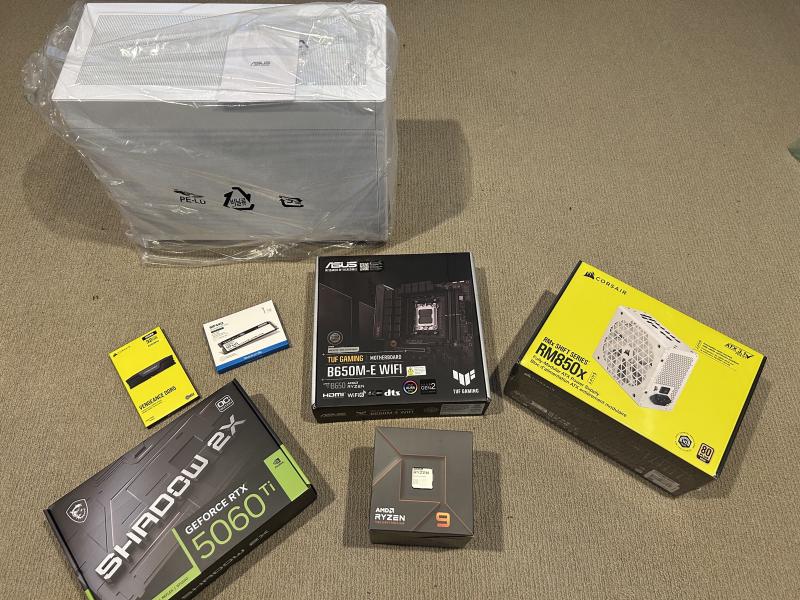
By August I’d accepted I needed a newer computer. Not wanting to spend crazy money but wanting to run the next tier of models properly, I went for an RTX 5060 Ti, 16GB of VRAM was the sweet spot for the bigger models, and replaying my old PC games on ultra settings was a nice bonus! Mid-August the intent model moved up to Qwen3:4b, and by September I’d caved and set both intent and chat to Qwen3:4b-instruct. Anything smaller just wasn’t usable. The verdict was clarifying but also a little deflating: this project was never going to run on a repurposed old computer or an edge device. Bigger models opened the door to more ambitious features, but the first few attempts at them turned out to also be dead ends.
4. Experiments That Didn’t Survive: KGLLM and Voice ID#
With real model capacity available, two ambitious personalisation ideas got their turn, and both taught their lessons by failing. The first was the “knowledge-graph LLM”, KGLLM: rather than cramming personal context into the system prompt as raw text, I built a structured family_facts.json of names, preferences and routines and augmented a separate 4B-instruct model with it, all wired through a nearly 300-line ai_knowledge.py. The second was voice identification, using SpeechBrain’s speaker-recognition model, with the goal of having the assistant respond differently to different household members.
Voice ID “kinda” worked. You had to record and train a model per person, it failed entirely on the kids’ voices, and it was genuinely jarring when it called you the wrong name; in a noisy family house it landed maybe one time in five. A cool tech demo, but not useful day to day.
The knowledge graph met a similar fate, its complexity never earned its keep, and the surviving idea was far simpler: write a fact in plain prose, load it into the prompt at startup, done. Between September 2025 and January 2026 the project basically went into sleep mode. I tinkered occasionally, but the setup was still janky and wasn’t anywhere near a replacement for the Echo’s I still had sitting in storage under the house.
A fresh mind after the Christmas break reframed the whole thing. Not more features, but a radical simplification.
5. The Monolith and the Qwen3 Moment: Collapsing the Stack#
Coming back energised, the instinct was to tear down the modular sprawl rather than add to it. I didn’t like the forest of separate containers and the Wyoming plumbing holding them together, so I stripped it all away and rebuilt everything as a single monolithic Python script. The LLM moved in-process via llama-cpp-python running a Qwen3-4B GGUF, Moonshine replaced the ageing Whisper, and Kokoro replaced Piper; smaller, faster, and a noticeable upgrade in voice quality. The whole thing got dramatically smaller, felt faster and, to my surprise, just worked.
Then, in late January 2026, Alibaba’s Qwen team open-sourced standalone ASR and TTS models. I wanted to try them immediately. Switching to Qwen3-ASR-1.7B was a real bet, Moonshine was purpose-built and working fine, but the Qwen models were the new state of the art and I really wanted to see what they were capable of. Also, it meant running all Qwen models and collapsing three ecosystems into one and making the dependency footprint vastly simpler. The TTS earned its place fast. Instead of preset voices it clones a speaker from a few seconds of reference audio and a transcript, drop a name.wav and name.txt into a folder and the assistant speaks in that voice. I scared my wife by having it talk in hers, decided that was a bit too creepy, and instead cloned Morgan Freeman from a documentary; the video I made drew a lot of attention on Reddit (though I kept that voice out of the public repo to avoid any legal grief). All of this coincided with the project finally getting a name and a shape, Fulloch, Fully Local Home, with proper core/, tools/ and utils/ modules, a YAML config, and a first basic Home Assistant integration.
A clean single-family pipeline was a huge leap forward but there were still some wrinkles in how audio was piped through the Docker containers that needed to be ironed out. A small job I thought…
6. Docker Audio Hell and Using the GPU: Earning Stability#
The new pipeline looked great in a demo, but containers have no natural access to the host’s audio hardware and echo cancellation features, so the setup broke whenever I changed a speaker or mic on my computer. Most of February went to nothing but trying to stabilise that. ALSA, PulseAudio, and the container’s own audio stack all had to be coaxed into cooperating. The solution that stuck made PulseAudio the authoritative routing layer, with PULSE_SOURCE and PULSE_SINK environment variables in compose.yml telling the container which sources and sinks to use.
With the pipeline stable, it was time to see how much I could push the hardware I’d bought. In May the SLM jumped from Qwen3-4B to Qwen3.5-9B-Q5_K_M with the commit message saying it plainly, “make use of the 5060 Ti’s 16GB VRAM.” At ~6.6GB the 9B fills a serious chunk of the card, and fitting it alongside the 1.7B versions of ASR and TTS took some genuine GPU trickery. Context was kept to 8K on the SLM and compiling the TTS with torch.compile’s reduce-overhead mode reuses its activation buffers across decode steps via CUDA graphs, saving ~4-5GB of VRAM, the difference between fitting and an out-of-memory crash. This only worked once I’d pinned all TTS generation to a single long-lived worker thread, because the graph manager lives in thread-local storage and a fresh thread per turn tripped an assert deep in the compiler. On the LLM side, deleting a stray defensive reset() call let llama.cpp reuse the prefilled system prompt across turns, dropping per-turn latency from ~1100ms to ~250-400ms, and a startup cache-prime plus a cleanup pass that shaved the tool registry from 228 lines to 139 trimmed the rest.
A bigger, stable model and audio pipeline finally made one of the harder interaction problems worth solving properly: interrupting the assistant mid-sentence.
7. Barge-In, Stalls, and Memory: Making It Feel Responsive#
With a capable model running on stable audio, the focus shifted to how the thing actually felt to talk to, starting with the feature that took the most iterations of anything in the project. Barge-in, interrupting the assistant mid-speech, landed in phases. First came a simple threading primitive, a TtsSession that could signal the worker to stop generating and abort playback. Then the harder half: the mic stays live during playback, so the assistant hears its own voice and might transcribe it as a wakeword. That self-echo problem was solved with a combination of PulseAudio echo cancellation reducing the leakage and a timing heuristic treating any transcription arriving within a narrow window of TTS ending as suspect. Getting a clean interrupt meant cancelling three distinct things in the right order, the LLM’s token stream, any stall phrase still playing, and the TTS audio output. All of which took careful coordination between threads.
Two smaller additions did a lot for the feel. First, stall phrases like “one moment”, “let me check that” are pre-rendered into audio at startup and cached, so when there’s a gap while the LLM thinks or a tool is awaiting a response, the user gets feedback that the assistant is doing something instead of leaving dead silence. Second, a deliberately simple notes system arrived as a successor to the old knowledge graph experiments. This system involved plain markdown files with tools provided to create new notes or read exising ones. A full-text search, and a BGE-small semantic search helped make retrieving information from the notes fast and accurate. A single facts markdown file provided more important long term information that could be loaded into the system prompt at startup for the LLM to utilise directly.
A responsive, memory-equipped assistant set the stage for the final leap in intelligence and integration.
8. The Agent Loop, HA Consolidation, and HACS: Closing the Loop#
Now that we were using a 9B model we could stop just matching intents and start genuinely reasoning over tools. Instead of the old “hear request → match intent → call tool → speak”, the LLM could become an orchestrator that could dispatch tools and form responses based on feedback. The trick is catching the easy stuff and making it quick to respond while still having the flexibility of longer agentic loops available when the user wants it. Tthis is ongoing and probably never-ending work, a small change to intent examples or prompting can improve one type of agentic response while completely wrecking five others! A regex fast-path still catches the common stuff (“play something”, “stop”, “set a timer for ten minutes”) before the LLM is ever called, that was an early trick I implemented that has survived through the whole project.
The same period brought a big cleanup. The project had accumulated direct integrations with seven smart-home systems: Spotify, Hue, LG ThinQ, WebOS TV, Pioneer AVR, Airtouch HVAC, Google Calendar. Each integration came with its own auth flow and API quirks. All of them were retired in favour of a single Home Assistant integration. I had not used Home Assistant up until now but saw the attraction immediately. Home Assistant had a much better setup for integrating all the possible smart home devices a person could have and the community supporting it was amazing. A HACS component makes the relationship bidirectional, Fulloch talks to Home Assistant to control devices, and HA can talk back, speaking through Fulloch’s voice from an automation (“it’s bin night” at 8pm), surfacing its state as sensors, and reacting to wakeword events. Another Reddit post in the Home Assistant community showed real interest in the project, keeping me motivated.
I did some tests using the VoiceDesign TTS model from Qwen, but speaker drift within conversations made it to weird to interact with, like everytime a different person was answering you. I switched back to fixed-reference Base cloning, which locks the voice by construction. VoiceDesign can still be used to generate new base models. It is a fun afternoon describing the voice you want for your assistant and seeing what it generates, some of the voices that were generated made me really wonder what data these models were trained on!
Finally, I wanted to give my assistant it’s own name/wakeword. I’d tried the project’s name as the wakeword, but “Fulloch” has no entry in the ASR’s vocabulary and came out as “fulik”, “full lock” and a dozen other things. A lot of regex pattern matching tests made me realise this was a dead end. After testing about 20 to 30 different possibilities, I finally landed on “Atticus”. A consonant-anchored real name with a natural “Hey” prefix that the ASR transcribes reliably, I just had to make sure it got properly filtered from transcriptions, otherwise every other response was asking me if I wanted to know more about the book “To Kill a Mockingbird”!
What had started as a brittle chain of containers was now a single coherent system, and after twelve months it was worth taking stock of where it actually landed.
Where Things Stand#
Twelve months from the first plan, the pipeline looks like this:
| Component | Technology |
|---|---|
| ASR | Qwen3-ASR-1.7B (always-on, streaming generator) |
| Wakeword | Tolerant regex on ASR transcription (“hey Atticus”) |
| SLM | Qwen3.5-9B-Q5_K_M via llama.cpp + GBNF grammar |
| TTS | Qwen3-TTS-12Hz-1.7B-Base, voice-cloned |
| Smart home | Home Assistant REST API |
| Notes | Local markdown store with BGE-small semantic search |
| Web search | Self-hosted SearXNG |
| Echo cancellation | PulseAudio module-echo-cancel |
| Deployment | Docker Compose with host audio passthrough |
flowchart TB
    Mic[(Microphone)] --> ASR[Qwen3-ASR-1.7B
always-on streaming]
    ASR -- "'hey Atticus'
regex match" --> FastPath{Regex
fast-path}
    FastPath -- "everything else" --> Agent[["Agent loop
Qwen3.5-9B + GBNF grammar"]]

    subgraph Tools["Tool registry"]
        direction TB
        HA[Home Assistant
+ HACS]
        Notes[Notes
BGE-small search]
        Web[Web search
SearXNG]
        Utils[Calculator, timers
+ date/unit conversion]
    end

    FastPath -- "common commands
(skip the LLM)" --> Tools
    Agent <-->|"pick a tool, get result,
repeat up to N turns"| Tools
    Agent --> TTS[Qwen3-TTS-12Hz-1.7B
voice-cloned]
    Tools --> TTS
    TTS --> Speaker[(Speaker)]
Everything runs on a single machine with an RTX 5060 Ti. No cloud. No subscriptions. No requests leaving the network (except for any web searches through SearXNG).
It still needs a lot of work. Echo cancellation, barge-in and agentic capabilities will require never-ending tweaking. I want to see how well a cheap conference speaker can work as the ‘satellite’ for the main Fulloch server, could I have more than one in multiple rooms around the house all linking back to the same server? What about those power-users who already have an LLM running on a home server, can they just connect that in through an OpenAI protocol rather than having a dedicated 9B model running just for Fulloch? So many questions and ideas still to be explored.
So now that I have built Fulloch, what do I actually use it for?#
For the “turn off the lights from the couch” use case, I am not really using it. It is a bit much to have a GPU running all day just for that.
Where it gets more interesting is as a work from home colleague. I can turn it on when my work day starts and ask it questions about ideas or thoughts as they come to me. It is all kept completely local, so don’t need to worry about any private or work-related information being shared to the cloud. While I’m reviewing something for work I’ll ask it to summarise today’s news, check what time those outdoor motion sensors went off last night or read out the weekend weather forecast without breaking focus or opening a browser. That’s the version of this I keep coming back to, and the one I’m most excited to push further: a private assistant I can brainstorm with, that helps juggle the work-and-family calendar, that genuinely feels like a colleague rather than a gimmick.
It’s early, and it’s far from finished but it works, and nothing you say to it ever has to leave your home. If that idea appeals to you, the whole thing is open source and I’d love for you to try it. Here’s how to get started.
All code is at GitHub, fulloch. The HACS integration can be installed directly from the Home Assistant Community Store.